7 proven ways to boost your car sharing ratings
March 25, 2025
min. read


Car sharing can be a tough business. Your fleet is constantly in motion, customers have high expectations, and every review can impact your reputation. The difference between a good business and one that struggles often comes down to customer satisfaction – and that means keeping your ratings high.
So, what are the best ways to improve ratings in car sharing? Here are some smart solutions that can make a real impact.
1. AI-powered photo verification to prevent surprises
No one likes picking up a car and finding it scratched, dented, or dirty. AI-powered photo verification helps prevent these problems before they affect your ratings. The system ensures that users take proper photos before and after their ride. If a car is parked badly or a photo doesn’t show the vehicle correctly, the system flags it. This reduces disputes, increases accountability, and improves overall service quality.
Users also feel more secure knowing that they won’t be held accountable for damage they didn’t cause. This small step significantly improves trust in your service, which in turn helps maintain higher ratings over time.
Want to integrate this? Check out how ATOM Mobility supports smart integrations.
2. Customer support that actually helps
Fast and effective customer support is a game changer. Users expect quick answers, especially when they’re locked out of a car or facing a technical issue. Integrating tools like Zendesk, Intercom, or Mavenoid provides live chat, automated AI-powered answers, FAQs, and even emoji-based responses to make communication smoother. Happy customers leave better ratings – it’s that simple.
A great support system also means fewer negative reviews, as frustrated users are less likely to vent online when they can quickly get the help they need. Plus, automated FAQs help users solve minor issues on their own without waiting for a response.
3. Great IoT connectivity for a better experience
A smooth, uninterrupted experience is one of the biggest factors in user satisfaction. Vehicle connectivity solutions ensure that cars are always accessible when needed. Imagine a user trying to unlock a car, but the IoT lags or the car doesn’t respond. Frustrating, right? Integrating reliable IoT solutions minimizes these issues, making your service more dependable. ATOM Mobility supports a wide range of IoT modules like Teltonika, Geotab, INVERS and several others. This means your fleet remains connected, responsive, and reliable no matter what car models you have in your fleet.
A connected fleet also allows operators to quickly detect vehicle malfunctions, battery levels, and maintenance needs, ensuring cars remain in top condition before issues escalate.
See how seamless connectivity makes car sharing better.
4. Let users rate their ride
Giving customers a voice is essential. By allowing them to rate their ride, you get valuable insights into what’s working and what’s not. Did they like the cleanliness? Was the car easy to access? Was the trip smooth? This data helps you adjust and improve, keeping your service top-notch. Plus, users appreciate being heard, which encourages them to leave better reviews.
Encouraging feedback also lets you identify problem areas before they turn into frequent complaints. A proactive approach keeps customers engaged and boosts loyalty.
5. Clear and simple pricing
Surprise fees are a surefire way to get bad ratings. Users want transparency when it comes to pricing. Make sure your app clearly displays all costs upfront, including any deposits, insurance fees, or extra charges. Simple and honest pricing leads to trust, and trust leads to better reviews.
It also helps to offer clear explanations of what happens in case of late returns, damages, or toll fees. When users know what to expect, they’re less likely to be upset when additional charges apply.

6. Keep your fleet in top shape with preventive maintenance
It might sound obvious, but maintaining your vehicles properly is a huge factor in customer satisfaction. No one wants to deal with a car that smells weird, has a flat tire, or makes strange noises. Regular inspections, automated maintenance tracking, and in-app damage reporting help keep your fleet in top condition. Implementing task automation can further improve fleet maintenance, ensuring vehicles are always in optimal condition with minimal manual intervention. Well-maintained cars, happy customers, higher ratings.
Adding small touches like air fresheners, charging cables, and regular interior cleaning can elevate the user experience. Even if a vehicle is a few years old, good upkeep makes all the difference in perception.
7. All-in-one dashboard for smarter management
You can’t improve what you don’t measure. An advanced dashboard lets you track vehicle performance, monitor customer feedback, and optimize operations in one place. ATOM Mobility’s dashboard solution provides detailed analytics, helping you stay on top of issues before they affect your ratings.
By leveraging data insights, operators can identify peak rental times, adjust pricing models, and plan fleet expansions accordingly. A well-optimized system keeps operations efficient and users satisfied. Additionally, vehicle damage management helps customers easily report damages, allowing operators to address issues faster and improve overall service quality.
Improving your car sharing ratings isn’t rocket science, but it does require the right tools. By integrating AI-powered photo verification, enhancing customer support, ensuring seamless connectivity, and keeping your fleet well-maintained, you can significantly boost user satisfaction. And when customers are happy, your ratings – and your business – will thrive.
%20(1).jpg)
🚗 Choosing car sharing software? Look beyond the rider app. Our checklist covers what to test in a demo, from keyless access and fleet operations to costs and support for both car sharing and digital rental.
Choosing car sharing software is more than choosing an app where customers can find and unlock a car. The same system has to verify drivers, take payments, communicate with vehicles, handle problems during a trip, and give your team the tools to keep cars available. The difference between two platforms often becomes clear only when something goes wrong: a customer cannot unlock a car, a payment fails, a vehicle needs to be taken out of service, or an operator wants to introduce advance bookings alongside short trips.
If you are comparing providers, ask them to show how these situations work in the actual product. Here is what to check.
“Car sharing” can mean several different things. A free-floating service lets customers find a nearby car and end a trip within an allowed area. A station-based service may require them to return the car to a specific location. Corporate fleets, peer-to-peer services, and self-service rentals have different booking, access, and approval rules.
Write down how your service will work before requesting demos:
Ask the provider to configure these rules in a demo. A platform that supports “car sharing” in general may still require development to support your exact model.
The app needs to do more than display vehicles on a map. Follow one booking from the first app open to the final receipt. Check registration, ID and driver's licence verification, vehicle discovery, booking, payment authorisation, keyless access, trip extension, damage reporting, and trip completion.
For advance rentals, check whether customers can book from your website as well as the app. Ask to see the complete web-to-app journey: selecting a vehicle and dates, confirming the reservation, and continuing to payment, licence verification, and vehicle access. Find out whether the website can complete the entire rental or whether customers must install the app after booking. ATOM Mobility's web-booker, for example, lets customers reserve on the web and then complete payment, and ID verification in the app.
Then test the exceptions. What does the customer see if verification fails, the car does not unlock, the vehicle is no longer available, or the payment cannot be collected? Can your support team see what happened and resolve it without contacting a developer?
This matters because customers judge the entire journey, including how quickly they can recover when a step fails.
Car sharing depends on reliable communication between the platform and the vehicle. Depending on the vehicle and hardware, this may include location, lock and unlock commands, mileage, fuel or battery level, and other status data. Ask for a list of supported telematics providers, rather than accepting a general statement that the platform is “hardware agnostic.” For your proposed fleet, establish:
Hardware flexibility is valuable when you expand or change suppliers, but the integration for the vehicles you plan to buy now is the first thing to verify.
The customer app gets the attention, but your team will spend much of its time in the management dashboard and operator tools. Ask a provider to show how staff:
Try these tasks with the roles your own team would use. The question is not only whether a feature exists, but how many manual steps it takes to run your fleet every day.
Car sharing and digital rental increasingly overlap. An operator might offer cars for short city trips and also accept bookings for a weekend. A rental business may begin with advance reservations and later add app-based, keyless access for shorter trips.
The technology shares many components, but the booking rules can differ. A rental may require advance pickup and return times, vehicle or category allocation, availability calendars, deposits, extensions, and different customer handover processes.
If you may operate both models, ask for a demonstration of both: an immediate hourly trip and an advance weekend booking. Check how the system prevents overlapping reservations, applies the correct pricing and deposit rules, and gives your team a clear view of availability. Also establish whether both models can use the same customer account and management setup, or whether additional products and fees are required.
ATOM Mobility supports vehicle sharing and digital rental on its platform. The useful question for any provider, including us, is how your exact combination of models would be configured and operated.
A low monthly licence fee can be attractive, but it may be only one part of the cost. Request a proposal that separates:
Launch, Setup, branding, app publication, migration, and training
Monthly minimums, fees per vehicle or booking, and included modules
Payment processing, refunds, deposits, and any additional transaction fees
Telematics hardware, installation, data plans, and new integrations
Ongoing work such as support level, custom development, and third-party services
Compare the likely cost at your launch fleet size and at a realistic larger fleet. Ask what happens if the fleet is seasonal or grows more slowly than planned.
Building in-house can make sense when a company has the engineering capacity and needs a customer experience or operating model that available platforms cannot support. It also means taking responsibility for project management, app updates, payments, vehicle integrations, security, monitoring, and support long after launch.
A white-label platform can shorten the route to market and spread that technical work across an established product. In return, you depend on the provider's supported features, integrations, development priorities, and service levels.
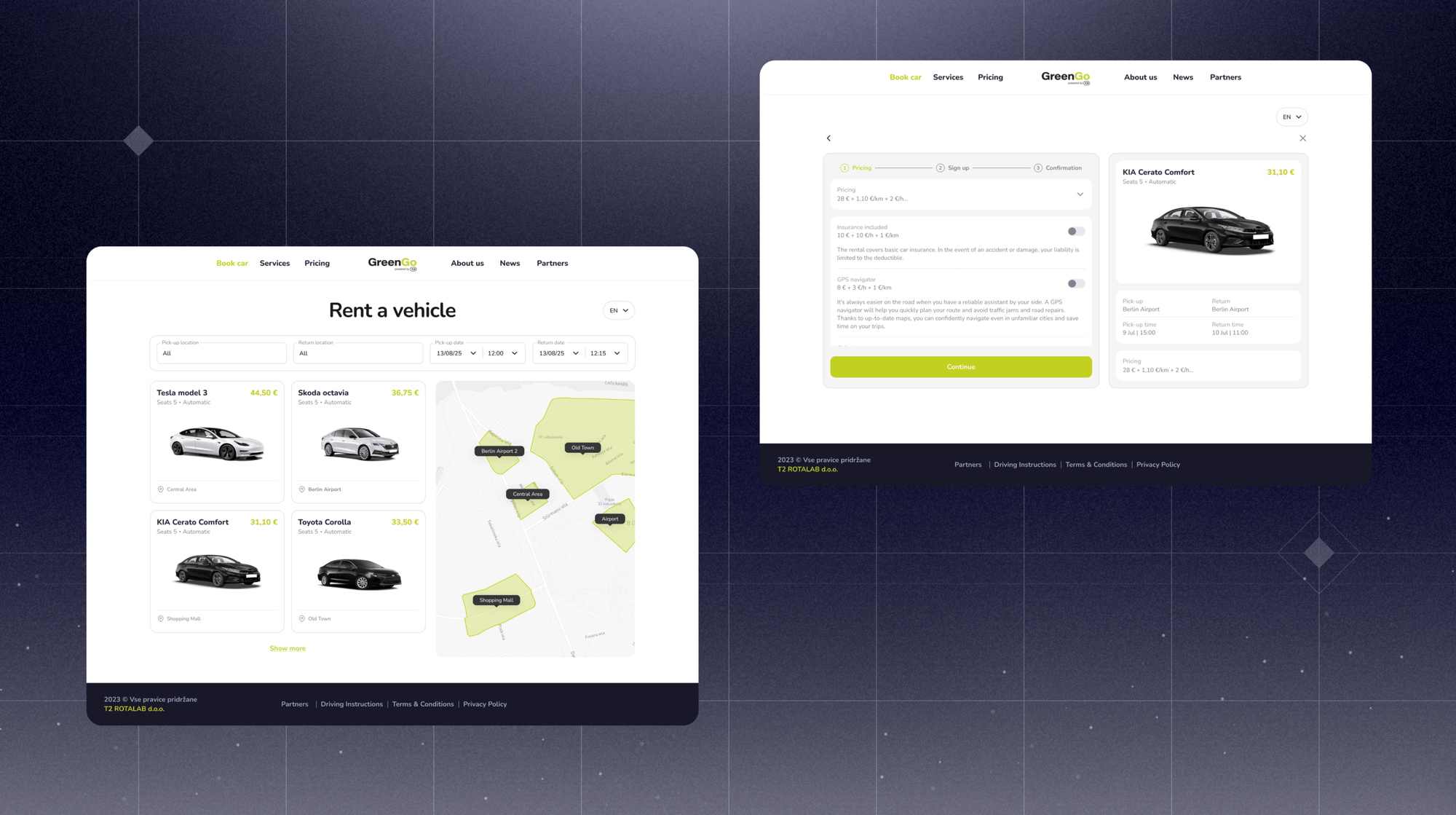
Slovenian car-sharing operator GreenGo initially spent two years developing its own app before switching to ATOM Mobility. Its experience shows why it is worth comparing the time and resources required to build with what an existing platform can already deliver. Read GreenGo's story: https://www.atommobility.com/blog/greengo-chooses-atom-mobility-to-power-its-electric-car-sharing-business
There is also a middle option: use a platform for core bookings, fleet management, and vehicle connectivity while building selected experiences or integrations yourself through APIs. If this is your plan, review the API documentation and confirm what your team can actually read, change, and automate.
Before signing, ask each shortlisted provider to demonstrate the same scenarios:
Use your intended vehicle models, payment markets, and operating rules in the discussion. For anything that cannot be shown, ask whether it is already available, needs configuration, requires paid development, or is only planned.
The best car sharing software is the one that supports your model reliably, gives your team control over daily operations, and leaves room for the business you intend to build next. A practical demo and a complete cost proposal will tell you more than a long feature list.
If you are evaluating car sharing alongside self-service rental, talk to ATOM Mobility about your fleet and operating model. We can show you how both models work on the platform and help you plan migration and scaling.
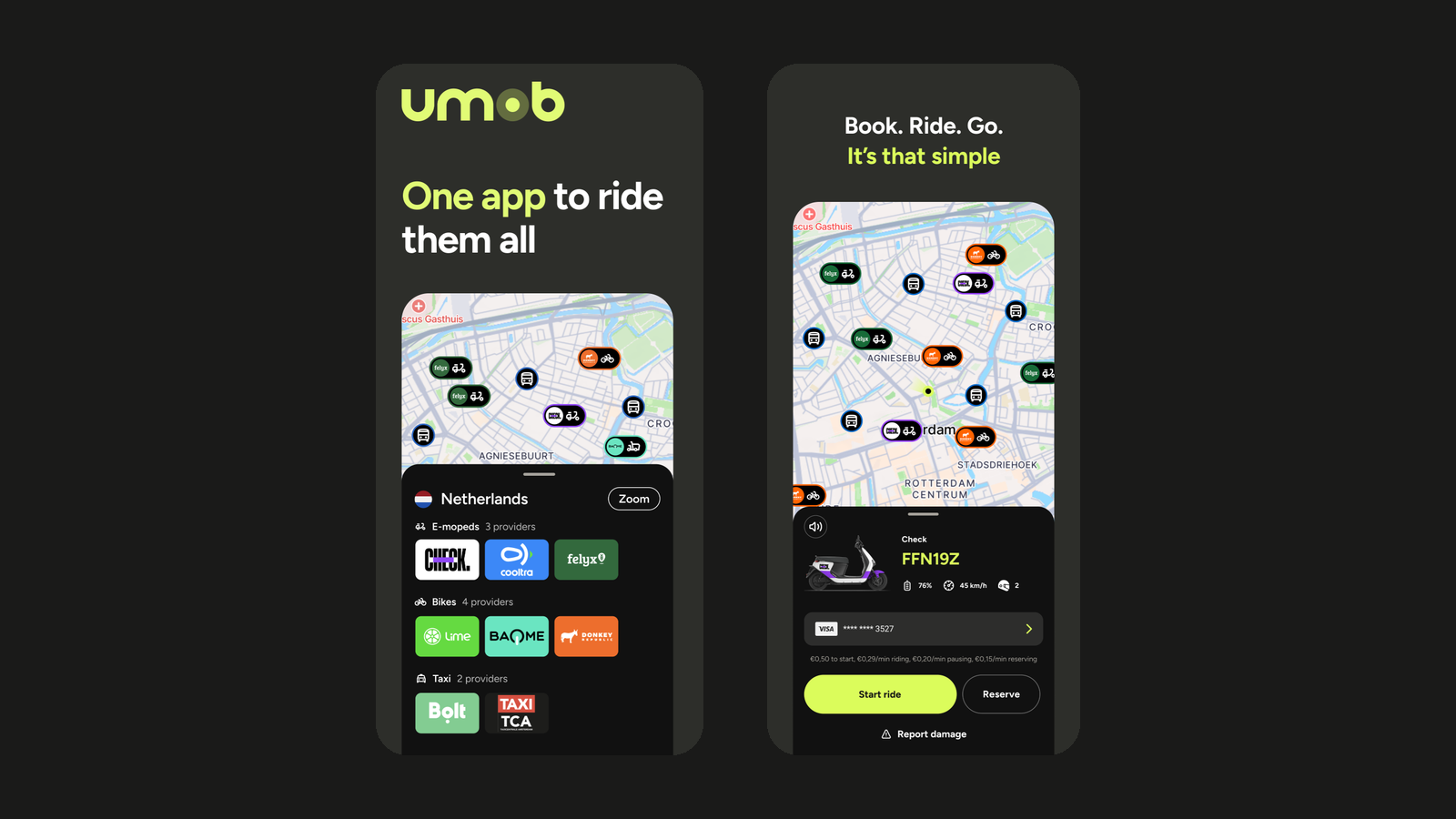
🌍 Reach more riders with ATOM Mobility and Umob. The integration gives shared mobility operators an additional distribution channel, helping attract new customers, generate more bookings and improve fleet utilization.
The future of mobility is not just about operating vehicles. It is about creating convenient journeys that bring different transportation options together in one simple customer experience.
That is why we are excited to highlight our partnership with Umob, helping mobility operators expand their reach and become part of a growing multimodal mobility ecosystem.
Whether you operate shared cars, scooters, bikes or mopeds through the ATOM Mobility platform, integrating with Umob allows your service to become accessible to thousands of Umob users looking for a convenient way to travel.
Today's users expect flexibility. They don't think in terms of individual mobility providers, they simply want the fastest, easiest, and most convenient route from A to B.
Umob brings different mobility providers and transport options together in one app. Users can find, compare, book and pay for different mobility options without having to download a separate app or create a new account for every provider.
By connecting your fleet to Umob, operators can:
For ATOM Mobility customers, the integration is designed to provide a straightforward way to unlock new distribution opportunities while continuing to manage their core operations through the ATOM Mobility platform.
Through the ATOM Mobility platform, participating operators can connect their fleets with Umob, enabling users to discover and use available vehicles directly through the Umob app.
Once connected, vehicles from participating operators can appear in Umob alongside other available mobility options, giving users one clear overview of the different ways they can get from A to B.
Users can discover an available vehicle, reserve and unlock it, start and end their ride, and pay directly through Umob.
The integration is designed to support:
Operators continue to manage their fleet, pricing, service areas and day-to-day operations through the ATOM Mobility platform, while Umob provides an additional channel through which users can discover and access their vehicles.
For mobility operators, connecting with Umob creates an additional distribution channel without changing the way they manage their day-to-day operations through ATOM Mobility.
By making vehicles available to thousands of Umob users, operators can increase their visibility at the moment people are actively looking for a ride. This creates the potential to attract new users, generate additional bookings and improve fleet utilization over time.
Every market is different, but many operators see MaaS partnerships as an important part of their long-term growth strategy.
One of the first ATOM Mobility operators to launch through the Umob integration is ZEUS Mobility, an ambitious European e-scooter sharing provider with a strong focus on innovation, a dynamic approach and challenging the established players in the market.
Fittingly, the partnership itself started through the ATOM Mobility network.
ZEUS and Umob first met at an ATOM Mobility event in Riga. While the initial introduction happened during the event, it was over drinks later that evening that the conversation really started.
ZEUS had already come across the Umob brand on mobility vehicles while travelling and had been impressed by the professional approach the company was taking. That recognition quickly turned into a conversation about how both companies could strengthen their propositions by working together.
From there, the integration moved forward quickly. ZEUS describes the preparation and integration process so far as “clean, professional and smooth.”
For ZEUS, the partnership creates an opportunity to strengthen the visibility of its brand, reach new customers and support its wider European growth ambitions.
Following its acquisition of Superpedestrian in May 2026, ZEUS is looking to accelerate its growth throughout 2026 and 2027, with the Umob partnership forming part of that ambition.
“ZEUS is thrilled to be partnering with Umob in European markets. Following our acquisition of Superpedestrian in May 2026, ZEUS is seeking to rapidly grow through 2026 and 2027. This partnership can help to drive this growth and reach new customers in new markets. We look forward to a rewarding partnership.” - Damian Young, ZEUS Mobility
One app to ride them all. Umob is an all-in-one mobility platform that brings different mobility providers and transport options together in one app.
Users can find, compare, book and pay for shared bikes, e-bikes, scooters, mopeds, public transport, taxis and other available mobility options through one account and one payment experience. Instead of downloading and registering with a separate app for every provider or every new city, users can open Umob and see the available mobility options around them.
Today, Umob is available in 28+ countries and 300+ cities, giving thousands of users an easier way to access different forms of mobility both at home and while travelling.
Key facts
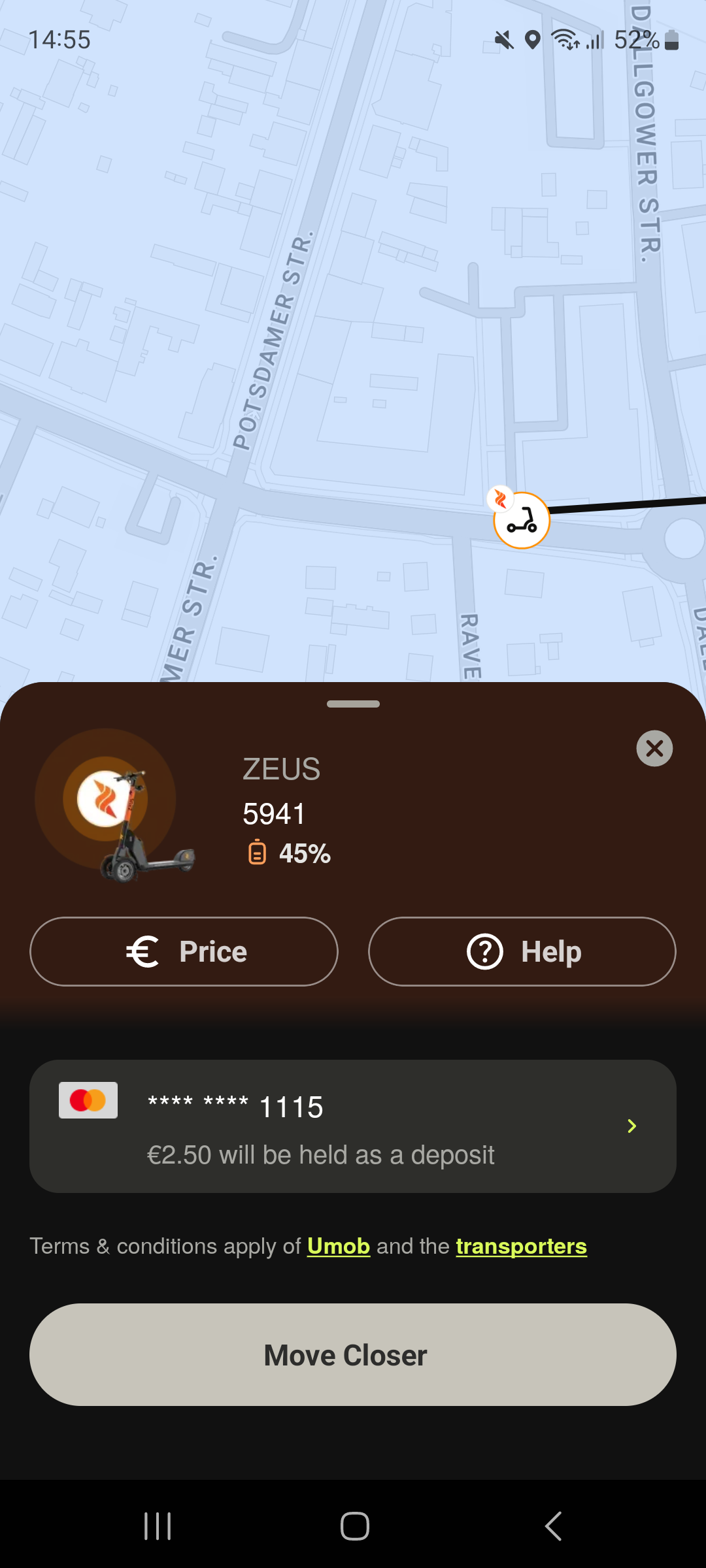
If you're already operating your shared mobility service on the ATOM Mobility platform, connecting with Umob could be the next step toward reaching more users and becoming part of a truly connected mobility ecosystem.
If you're interested in enabling the integration or learning more about how it works, get in touch with our team. We look forward to helping more operators connect, collaborate, and make sustainable mobility easier for everyone.
Use test credentials to log in - Phone number: +1 123123123, Code: 777777


Driver App demo credentials - Email: test@atom.com, Password: driver